
Help center / Account & Security
Active sessions
See the connected devices and end sessions.
Under Settings, on the Profile tab, in the Security section, the Sessions block lists the devices connected to your account ("Devices connected to your account."). It's a way to check whether there's any access you don't recognize.
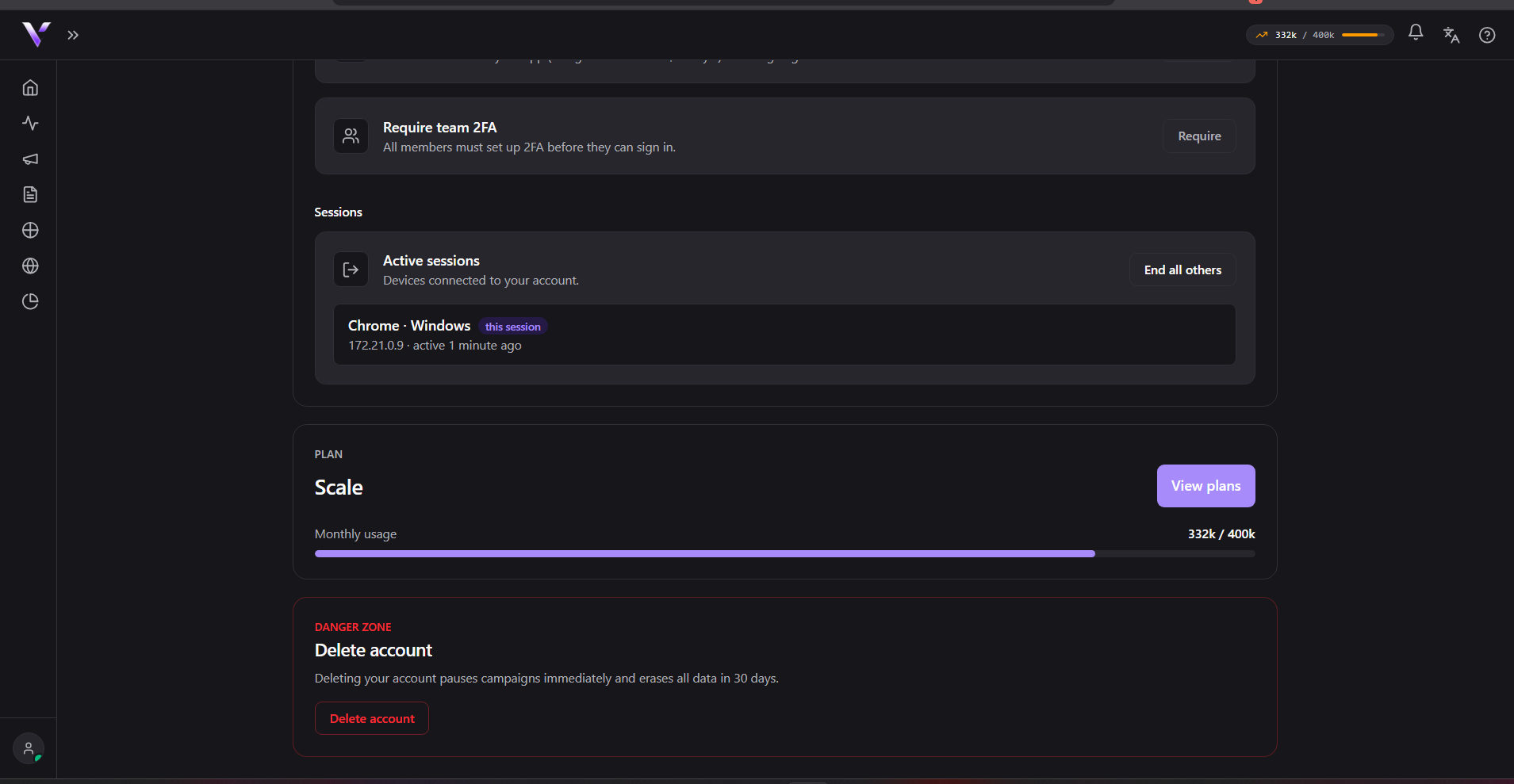
For each session you see the device/browser (or "Unknown browser" when the panel can't identify it) and how long it's been active ("active … ago"). Your current session is marked as this session. If there are no sessions on record, the block shows "No sessions recorded yet.".
Ending sessions
- End: next to each session (except the current one), disconnects that specific session.
- End all others: keeps only the current session and disconnects all the rest at once. When done, the panel confirms how many sessions were ended.
If you suspect unauthorized access, end the other sessions and then change your password (see Change email and password).
Common issues
- I don't recognize one of the listed devices. Use End on that specific session, or End all others to drop everything at once, then change your password right after.
- The "End" button doesn't show on one of the rows. That's your current session (marked as this session), so it can't be ended from this list (ending your own session is done by signing out).
- I ended a session and the device stays connected for a few more seconds. Ending it drops the session on the server; the device only notices on its next action in the panel.
Protect your campaigns with Vellar
Build the page and choose how to publish it: protected for paid traffic, or open for anything else.
See how it works